
user_profile
User profile
Managing Your User Profile
Follow these steps to view and manage your user profile:
- Access Your Profile: Click on your profile icon or username located in the upper-right corner of the screen.
- View Profile Information: Select the My Profile option to view your personal and account information.
- Update Profile: Edit the available profile details, such as your name, contact information, and other relevant information.
- Save Changes: Click the Update or Save Changes button to apply your modifications.
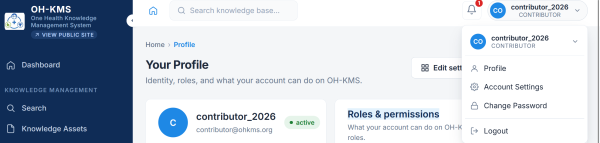
Note: Ensure that you save any changes before leaving the profile page. You can also view your Roles & permissions
user_profile.txt · Last modified: by 196.191.221.159