
browsekacategories
Table of Contents
Browse Knowledge Asset Domains (Taxonomy)
Purpose
The Knowledge Asset Domains function enables users to navigate the knowledge repository by subject or classification rather than searching with keywords. Browsing is particularly useful when users wish to explore available knowledge resources or are unfamiliar with the exact title of a document.
Knowledge assets may be organized into categories and subcategories according to the organization's knowledge classification framework.
Steps
To browse knowledge asset domains
- Open the OHKMS home page.
- Select Knowledge Asset Domains.
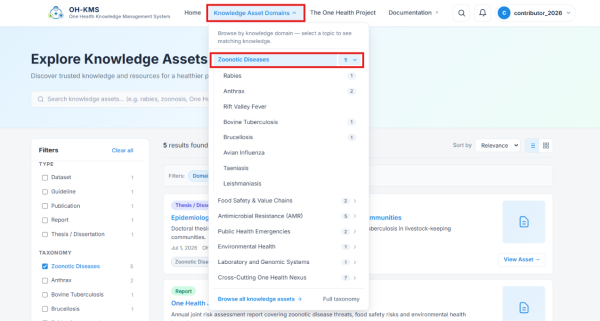
- The available knowledge asset categories will be displayed.
- Select a category to view the knowledge assets it contains.
- If subcategories are available, expand the category and select the desired subcategory.
- Browse the list of available knowledge assets.
- Select a knowledge asset to view its details.
Tip: Browsing is useful when you wish to explore available resources without using specific search keywords.
Information Displayed
Depending on the system configuration, each category may display:
- Category name
- Number of knowledge assets
- Subcategories
Best Practices
When browsing the repository:
- Explore related subcategories to discover additional resources.
- Use category descriptions to identify the most appropriate topic.
- Combine browsing with keyword searching when looking for specific information.
- Review recently added knowledge assets for the latest information.
browsekacategories.txt · Last modified: by wiki