
This is an old revision of the document!
Viewing Your User Profile
Every authenticated OHKMS user (Contributor, Reviewer, Curator, Knowledge Manager, and Super User) has a personal user profile. The profile contains information associated with your account, including your personal details, contact information, and system role.
Keeping your profile information accurate ensures that other users can identify and contact you when necessary and helps maintain an up-to-date user directory. Many knowledge management systems provide users with a personal profile page where they can view and update their own account information, subject to permissions defined by the system administrator.
View Profile
The View Profile function allows you to view your personal account information and assigned role(s) within OHKMS. Depending on your permissions, some information may be read-only.
To View Your Profile
- Log in to OHKMS using your User ID and Password.
- Click your Profile icon or username in the navigation bar.
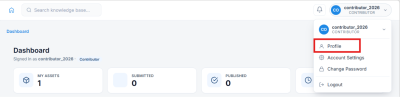
- Select My Profile from the menu.
- Your profile page will open and display your account information.
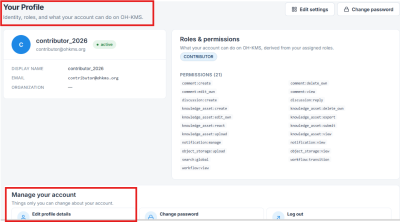
The profile may include information such as:
- Full name
- Username
- Email address
- Organization
- Department or Institution
- Job title
- User role
- Contact information
- Profile photograph (if enabled)
- Date the account was created
- Last login date
Note: The information displayed may vary depending on your assigned role and your organization's system configuration.