
This is an old revision of the document!
Table of Contents
The Knowledge Asset Review Workflow
Purpose
The Knowledge Asset Review Workflow is a structured process within OHKMS designed to ensure that knowledge assets submitted to the platform are accurate, relevant, complete, appropriately classified, and suitable for dissemination to their intended audiences.
The workflow provides a systematic mechanism for evaluating knowledge assets before they are published and made accessible to OHKMS users. It supports quality assurance, accountability, consistency, and the integrity of information shared through the system.
Through this workflow, authorized reviewers can examine submitted knowledge assets, provide feedback, request revisions, approve submissions, or reject assets that do not meet the established quality requirements.
Overview
Knowledge assets may include technical reports, research publications, policy briefs, guidelines, training materials, case studies, standard operating procedures, presentations, and other resources relevant to the One Health approach.
The review workflow is initiated when a knowledge asset is submitted for review. Depending on the configured approval process, the asset is assigned or made available to an authorized reviewer who evaluates its content and supporting information.
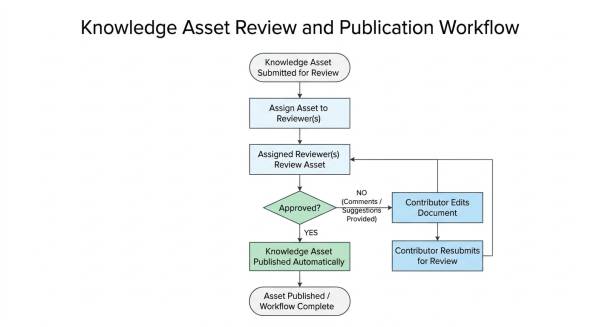
The review process generally involves the following stages:
- Submission: A contributor submits a knowledge asset for review.
- Review Assignment: The system routes the submitted asset to an authorized reviewer.
- Evaluation: The reviewer examines the asset and its associated metadata.
- Review Decision: The reviewer approves the asset, requests revisions, or rejects the submission.
- Revision and Resubmission: Where revisions are requested, the contributor updates the asset and submits it again.
- Approval and Publication: Approved assets proceed to publication according to the configured publishing permissions.
Procedure
Step 1: Access the Knowledge Asset Review Interface
- Log in to the OHKMS platform using your authorized user credentials.
- Navigate to the Knowledge Management section from the main navigation menu.
- Open the knowledge asset management interface.
- Locate the section containing assets awaiting review, such as Pending Review or Review Queue, depending on the system configuration.
- Review the list of submitted knowledge assets.
The review interface may display information such as the asset title, contributor, submission date, category, and current review status.
Step 2: Select a Knowledge Asset for Review
- Browse the list of pending knowledge assets.
- Identify the asset you intend to review.
- Select the asset title or its corresponding view or review action.
- Open the asset details page.
- Examine the information provided by the contributor, including:
- - Asset title and description.
- - Knowledge category or thematic area.
- - Author or contributing organization.
- - Keywords and associated metadata.
- - Attached documents or supporting resources.
- - Submission date and review status.
- Open or download the associated document, where this functionality is available, to examine its content.
Tip: Review both the knowledge asset's content and its metadata. Accurate metadata improves searchability, categorization, and the discoverability of resources within OHKMS.
Step 3: Evaluate the Knowledge Asset
Carefully examine the submitted knowledge asset to determine whether it meets the required quality and relevance standards.
The evaluation should consider the following criteria:
| Review criterion | Description |
|---|---|
| Relevance | The asset addresses a subject relevant to One Health priorities, knowledge-sharing objectives, or the intended audience. |
| Accuracy | The information is technically sound, factually correct, and supported by credible evidence. |
| Completeness | The asset contains the essential information, references, and supporting materials required for its intended purpose. |
| Clarity | The content is clearly presented, understandable, and appropriately organized. |
| Metadata quality | The title, description, keywords, category, and other metadata accurately represent the asset. |
| Source credibility | The author, organization, or source of the information is identifiable and sufficiently reliable. |
| Timeliness | The information is sufficiently current for its intended use, or its historical relevance is clearly identified. |
| Compliance | The asset satisfies applicable content standards, confidentiality requirements, copyright conditions, and organizational policies. |
During the evaluation:
- Read the knowledge asset carefully.
- Verify the relevance and completeness of the information.
- Examine the accuracy of the accompanying metadata.
- Check for duplicate, outdated, or inappropriate content.
- Identify any errors, omissions, or areas requiring clarification.
- Determine whether the asset meets the requirements for approval.
Note: Knowledge assets containing sensitive or restricted information should be evaluated against applicable information-sharing and access-control requirements before approval.
Step 4: Record the Review Decision
After completing the evaluation, select the appropriate review action.
The following decisions may be available, depending on the configured workflow:
Approve: Select this action when the knowledge asset meets the required quality standards and is suitable for publication or the next approval stage.
**Request Revision: ** Select this action when the asset is relevant but requires corrections, clarification, additional information, or metadata improvements before approval.
**Reject: ** Select this action when the knowledge asset is unsuitable for publication or does not meet the required standards.
To record the decision:
- Locate the review action controls on the asset details page.
- Select the appropriate decision.
- Enter review comments or justification, where the system provides a comment field.
- Confirm that the selected action reflects your evaluation.
- Submit or save the review decision.
Warning: Before approving or rejecting a knowledge asset, verify that you have selected the correct asset and review action. Depending on the system configuration, some decisions may be difficult to reverse without administrator intervention.
Step 5: Request Revisions and Provide Feedback
If the knowledge asset requires modifications, the reviewer should provide clear, constructive, and actionable feedback to the contributor.
- Select the action for requesting revisions.
- Enter comments describing the issues identified during the review.
- Specify the sections or metadata fields that require correction.
- Explain the changes necessary for approval.
- Submit the revision request.
- Verify that the asset is assigned an appropriate revision status.
Review comments should be specific enough to enable the contributor to address the identified issues without unnecessary clarification.
Example review comment:
The submitted knowledge asset is relevant to One Health surveillance activities. However, the document requires updated references, a clearer description of the methodology, and additional keywords to improve its discoverability. Please address these issues and resubmit the asset for review.
Step 6: Revise and Resubmit the Knowledge Asset
When a revision request has been issued, the contributor should update the knowledge asset according to the reviewer's comments.
- Log in to the OHKMS platform using the contributor account.
- Navigate to the knowledge asset management interface.
- Locate the asset returned for revision.
- Open the asset details or editing interface.
- Review the feedback provided by the reviewer.
- Modify the content, metadata, or attachments as required.
- Save the updated knowledge asset.
- Resubmit the asset for review using the available submission action.
Tip: Contributors should address all review comments before resubmitting a knowledge asset. This helps minimize repeated review cycles and reduces delays in publication.
Step 7: Approve the Knowledge Asset
Once the reviewer determines that the knowledge asset meets the required standards, the asset can be approved.
- Open the knowledge asset awaiting final review.
- Confirm that all previously identified issues have been addressed.
- Verify that the asset content and metadata are complete and accurate.
- Select Approve or the equivalent action available in the system.
- Enter any final review comments, if required.
- Confirm the approval action.
- Verify that the asset's review status has been updated.
Depending on the configured workflow, approval may either make the asset available for publication or forward it to another authorized user for final publishing.
Step 8: Verify Publication Status
Following approval, the reviewer or another authorized user should verify that the knowledge asset has reached its intended publication status.
- Navigate to the knowledge asset repository or management interface.
- Search for the approved knowledge asset.
- Open its details page.
- Verify the displayed publication status.
- Confirm that the title, description, category, and attached resources are correct.
- Where the asset has been published, verify that it is accessible to the intended audience.
Note: Approval and publication may be separate actions. An approved knowledge asset should not be assumed to be publicly accessible until its publication status and access permissions have been confirmed.
Knowledge Asset Review Workflow Diagram
The following diagram illustrates the logical sequence of activities and decisions involved in the review process.
Knowledge Asset Review Statuses
The review workflow uses status indicators to communicate the current stage of a knowledge asset. The following table describes common workflow statuses; actual status names may differ in OHKMS.
| Status | Description |
|---|---|
| Draft | The asset has been created but has not yet been submitted for review. |
| Pending Review | The asset has been submitted and is awaiting evaluation. |
| Under Review | An authorized reviewer is evaluating the asset. |
| Revision Requested | The reviewer has requested corrections or additional information. |
| Resubmitted | The contributor has revised the asset and returned it for evaluation. |
| Approved | The asset has successfully completed the required review process. |
| Rejected | The asset has not met the requirements for approval. |
| Published | The approved asset has been made accessible to its intended audience. |
Roles and Responsibilities
The knowledge asset review process involves different user roles, each with specific responsibilities.
| User role | Primary responsibilities |
|---|---|
| Knowledge Contributor | Creates, submits, revises, and resubmits knowledge assets. |
| Knowledge Reviewer | Evaluates submitted assets, provides feedback, and records review decisions. |
| Knowledge Manager or Publisher | Oversees content quality and publication, where this role is configured. |
| System Administrator | Manages user permissions, workflow configurations, and technical issues affecting the review process. |
Note: The availability of these roles and their specific permissions depends on the OHKMS role-based access-control configuration.
Best Practices
To maintain the quality and effectiveness of the Knowledge Asset Review Workflow, reviewers and contributors should observe the following practices:
- Maintain objectivity: Evaluate assets against established quality criteria rather than personal preferences.
- Provide constructive feedback: Clearly identify deficiencies and explain the required corrections.
- Ensure metadata accuracy: Verify that titles, descriptions, keywords, and classifications correctly represent the knowledge asset.
- Protect sensitive information: Confirm that restricted or confidential information is handled according to applicable policies.
- Avoid unnecessary delays: Review assigned assets promptly and communicate revision requirements clearly.
- Maintain traceability: Record review comments and decisions to support accountability and future reference.
- Verify final publication: Ensure that approved knowledge assets are correctly published and accessible to their intended audiences.