This is an old revision of the document!
Table of Contents
Filters
Purpose
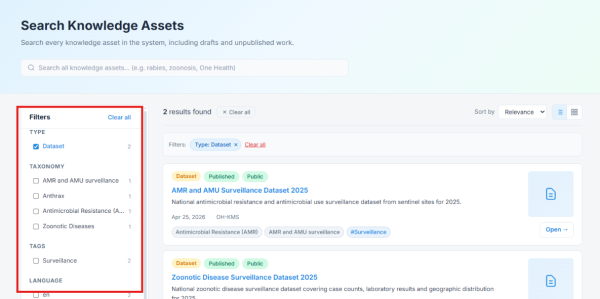
Filters allow users to narrow search results after a search has been performed. Rather than conducting a new search, filters refine the existing results to display only the most relevant knowledge assets.
Filtering is particularly useful when a search returns a large number of results. Search filters (also known as facets) commonly allow users to refine results by attributes such as category, author, document type, or date.
Applying Filters
To apply filters
- Perform a search.
- Locate the Filters panel.
- Select one or more filter options.
- The search results will automatically update to display matching knowledge assets.
Typical filters may include:
- - Knowledge Domain
- - Knowledge Asset Type
- - Author
- - Category
- - Publication Date
- - Language
- - Organization
- - Keywords
Clearing Filters
To remove filters:
1. Select Clear all or deselect the applied filter(s). 2. The complete list of search results will be displayed again.
Best Practices
To improve search precision:
- Apply one filter at a time. - Combine multiple filters when searching large repositories. - Remove unnecessary filters if too few results are returned. - Review the active filters before performing another search.