This is an old revision of the document!
Table of Contents
Deleting a Draft Knowledge Asset
Purpose
The Delete Knowledge Asset function allows a Contributor to permanently remove a knowledge asset that is still in Draft status. This feature is useful when a draft is no longer required, was created in error, or needs to be replaced with a new submission.
A knowledge asset saved as a draft may be edited, deleted, or submitted for review. Once a knowledge asset has been submitted for review, it can no longer be deleted by the Contributor.
Note: Deleting a draft knowledge asset permanently removes the draft and any associated metadata or attachments. This action cannot be undone.
To Delete a Draft Knowledge Asset
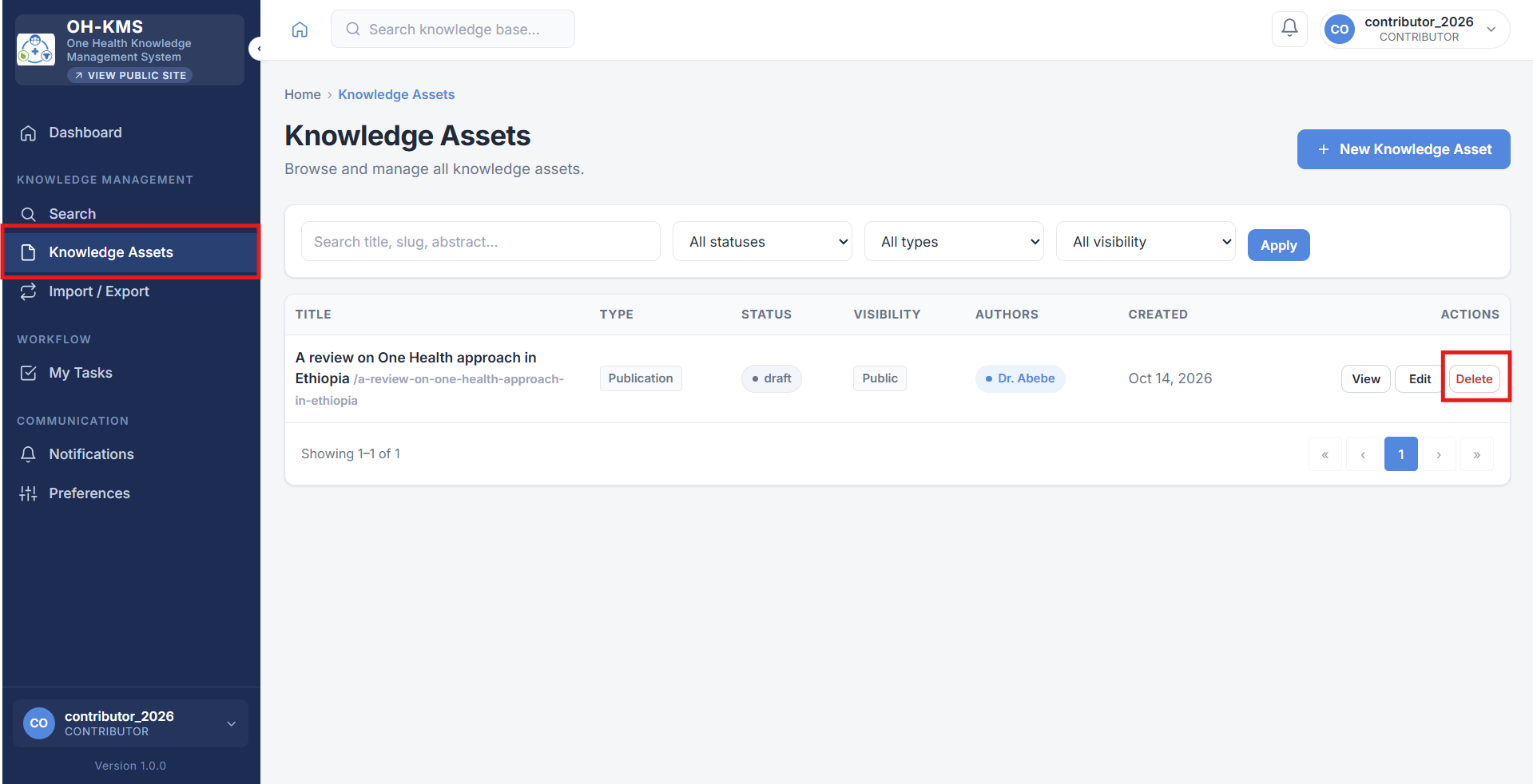
1. Log in to OHKMS using your User ID and Password. 2. From the left navigation panel, select Knowledge Assets. 3. The list of your knowledge assets will be displayed. 4. Locate the knowledge asset with the status Draft that you wish to delete. 5. Click the Delete button corresponding to the selected knowledge asset. 6. When prompted, confirm that you want to delete the draft. 7. The selected draft knowledge asset will be permanently removed from the system.
Confirmation Message
Before deleting a draft, OHKMS displays a confirmation message to help prevent accidental deletion.
Select:
- Yes or Confirm to permanently delete the draft. - No or Cancel to return to the knowledge asset list without deleting the draft.
Restrictions
The Delete function is available only for knowledge assets that:
- Are in Draft status. - Are owned by the currently logged-in user. - Have not yet been submitted for review.
Knowledge assets that have been submitted, approved, published, or archived cannot be deleted by Contributors. If such a knowledge asset must be removed, contact the Knowledge Manager or Super User, who will determine the appropriate action in accordance with your organization's policies.
Best Practices
Before deleting a draft knowledge asset:
- Confirm that the draft is no longer required. - Ensure that any important information has been copied or incorporated into another knowledge asset, if applicable. - Verify that you are deleting the correct draft, especially if you have multiple drafts with similar titles.
Troubleshooting
| Problem | Possible Solution |
|---|---|
| Delete button is not displayed | Verify that the knowledge asset is in Draft status and that you are the owner of the draft. |
| Unable to delete the draft | Refresh the page and try again. If the problem persists, contact the System Administrator. |
| Deleted the wrong draft | Deleted drafts cannot normally be recovered. Contact the System Administrator immediately to determine whether recovery from a system backup is possible. |
Deleting Knowledge Asset
A knowledge Asset that is saved as draft can be edited, deleted, or saved as final and submitted for review. To delete a draft knowledge asset
- Select the Knowledge Assets button on the left panel
- Identify the draft knowledge asset you want to delet
- Click on the delete button on the identified row