Table of Contents
Editing a Draft Knowledge Asset
Purpose
The Edit Knowledge Asset function allows Contributors to modify a knowledge asset that has been saved as a draft but has not yet been submitted for review. Users can update the metadata, revise the content, replace or add attachments, and save their changes before submitting the knowledge asset for the review and approval process.
A knowledge asset may be edited multiple times while it remains in Draft status.
Note: Once a knowledge asset has been submitted for review, editing may no longer be permitted unless it is returned to the Contributor for revision.
To Edit a Draft Knowledge Asset
- Log in to OHKMS using your User ID and Password.
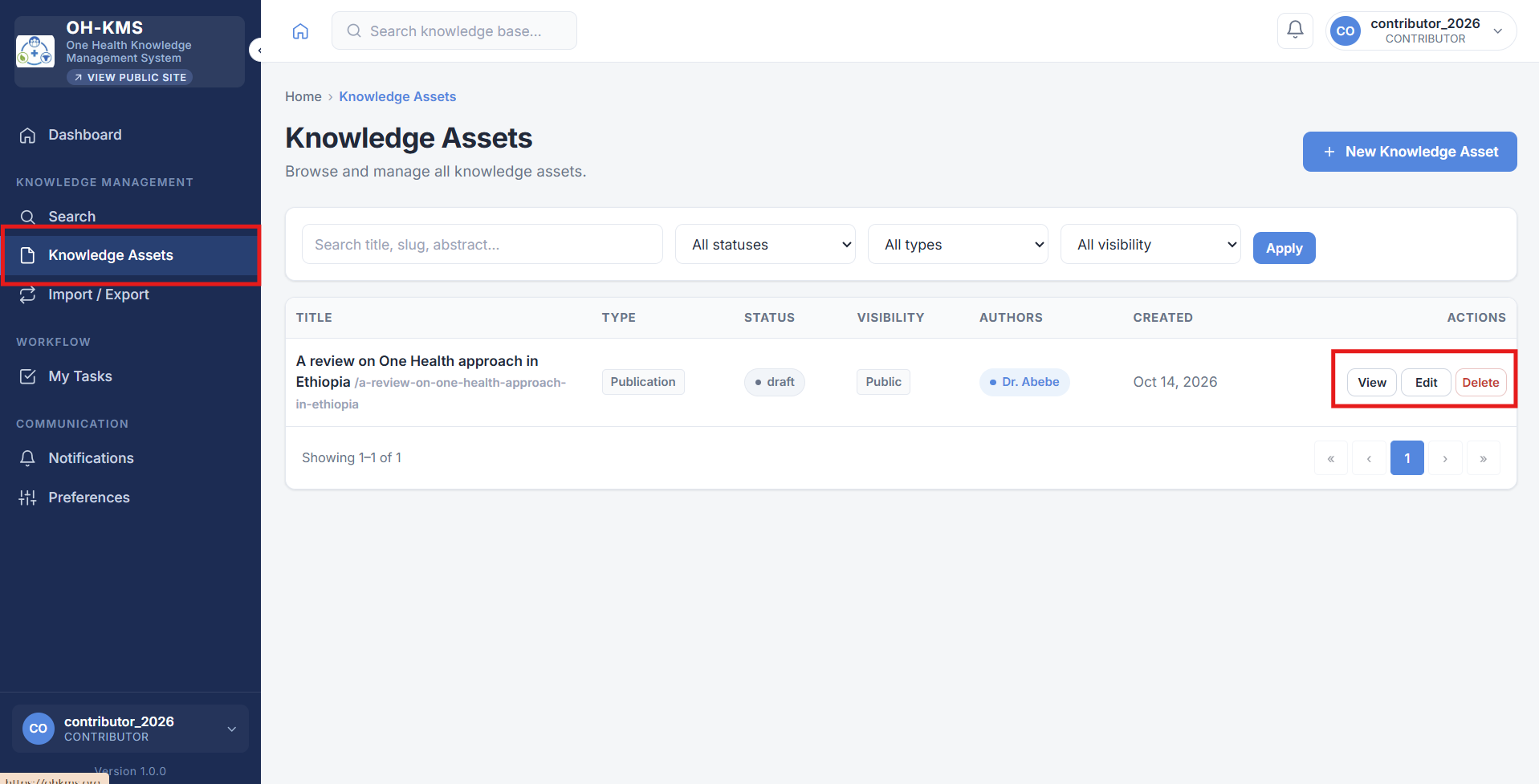
- From the main menu, select My Knowledge Assets or My Submissions.
- Locate the knowledge asset with the status Draft.
- Click the Edit button or select the knowledge asset title.
- The knowledge asset editing page will open.
- Update the required information.
- Save your changes by clicking Save Draft.
- Continue editing later, or click Submit for Review when the knowledge asset is complete.
Information That Can Be Edited
Depending on the system configuration, you may edit the following information:
- Title
- Abstract or summary
- Knowledge domain
- Knowledge asset type
- Keywords
- Description
- Authors or contributors
- Organization or institution
- Publication information
- Attachments and supporting documents
- Additional metadata required by your organization
Managing Attachments
While editing a draft, you may:
- Upload additional supporting files.
- Replace an existing attachment with an updated version.
- Remove attachments that are no longer required.
- Reorder attachments, where supported.
Tip: Ensure that uploaded files are the correct versions before submitting the knowledge asset for review.
Saving Your Changes
OHKMS allows Contributors to save their work as a draft without submitting it for review.
Selecting Save Draft will:
- Save all changes made during the current editing session.
- Retain the knowledge asset in Draft status.
- Allow you to continue editing the knowledge asset at a later time.
The knowledge asset will not enter the review workflow until you select Submit for Review.
Submitting the Draft
Once all required information has been completed and reviewed:
- Verify that all mandatory fields have been completed.
- Confirm that the attached files are correct.
- Review the metadata for accuracy.
- Click Submit for Review.
- Confirm the submission if prompted.
The knowledge asset status will change from Draft to Submitted, indicating that it has entered the review workflow.
Best Practices
When editing a draft knowledge asset:
- Use a clear and descriptive title.
- Verify the accuracy of all metadata before submission.
- Include relevant keywords to improve discoverability.
- Upload the final versions of all supporting documents.
- Review the content carefully for completeness and accuracy before submitting it for review.