Table of Contents
Editing Your User Profile
Every authenticated OHKMS user (Contributor, Reviewer, Curator, Knowledge Manager, and Super User) has a personal user profile. The profile contains information associated with your account, including your personal details, contact information, and system role.
Keeping your profile information accurate ensures that other users can identify and contact you when necessary and helps maintain an up-to-date user directory. Many knowledge management systems provide users with a personal profile page where they can view and update their own account information, subject to permissions defined by the system administrator.
Edit profile
The Edit Profile function allows authenticated users to update selected personal information associated with their OHKMS account. Certain fields may be editable, while others are managed by the System Administrator and cannot be changed by users. Many enterprise systems allow users to edit contact information while protecting administrator-controlled fields such as usernames and assigned roles.
To Edit Your Profile
- Log in to OHKMS.
- Open My Profile.
- Click Edit Profile.
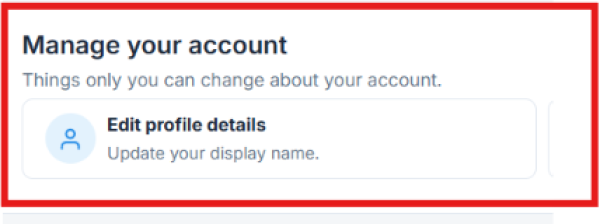
- Update the required information.
- Review your changes for accuracy.
- Click Save or Update Profile.
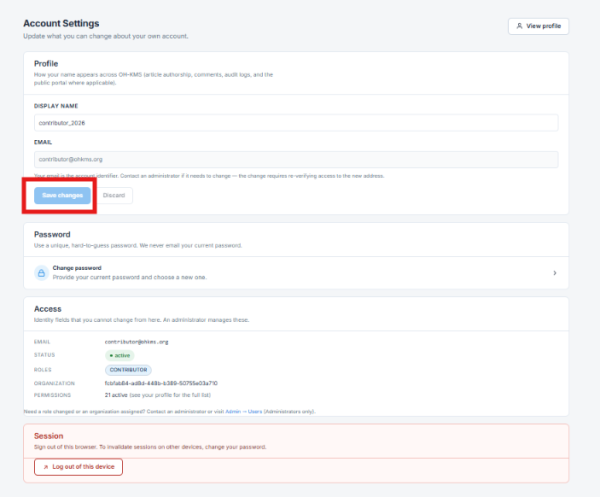
- Wait for the confirmation message indicating that your profile has been successfully updated.
Information You May Be Able to Update
Depending on your permissions, you may be able to edit the following information:
- Full name
- Email address
- Telephone number
- Organization
- Department
- Job title
- Professional biography
- Profile photograph
- Areas of expertise
- Communication preferences
Information You Cannot Edit
For security and administrative reasons, the following information is typically managed by the System Administrator and cannot be modified by users:
- Username (User ID)
- Assigned user role
- Account status
- Date the account was created
- System permissions
- Access privileges
If any of these details need to be changed, contact your System Administrator or Knowledge Manager.
Best Practices
To maintain an accurate and effective user profile:
- Keep your contact information up to date.
- Upload a professional profile photograph, if permitted.
- Review your profile information periodically.
- Ensure that your email address is current so you can receive system notifications.
- Do not share your login credentials with other users.