Table of Contents
Download Files
Purpose
The Download Files function allows users to save attached documents and other digital resources to their local computer or mobile device for future reference.
Downloads are subject to user permissions and the access restrictions applied to individual knowledge assets.
Steps
To download a file
- Open the required knowledge asset.
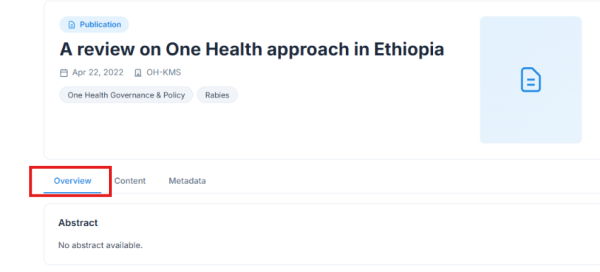
- Scroll down and locate the file you wish to download.
- Click the Download button or file name.
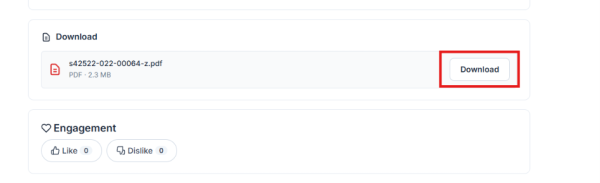
- If prompted by your browser, choose a location to save the file.
- Wait for the download to complete.
- Open the downloaded file using the appropriate application.
Supported File Types
Depending on the knowledge asset, downloadable files may include:
- PDF documents
- Microsoft Word documents
- Microsoft Excel spreadsheets
- Microsoft PowerPoint presentations
- Images
- Videos
- Audio recordings
- Compressed archive files
- Other approved digital formats
Download Permissions
Access to downloadable files depends on:
- Your assigned user role.
- The visibility level of the knowledge asset.
- Organizational access policies.
- Copyright or licensing restrictions.
If a download option is unavailable, you may not have sufficient permission to access the file.
Best Practices
When downloading knowledge assets:
- Download only documents that are relevant to your work. - Store downloaded files securely in accordance with your organization's information security policies. - Verify that downloaded resources are the latest available version before using them. - Respect copyright, licensing, and confidentiality requirements when sharing downloaded materials.