Table of Contents
Deleting a Draft Knowledge Asset
Purpose
The Delete Knowledge Asset function allows a Contributor to permanently remove a knowledge asset that is still in Draft status. This feature is useful when a draft is no longer required, was created in error, or needs to be replaced with a new submission.
A knowledge asset saved as a draft may be edited, deleted, or submitted for review. Once a knowledge asset has been submitted for review, it can no longer be deleted by the Contributor.
Note: Deleting a draft knowledge asset permanently removes the draft and any associated metadata or attachments. This action cannot be undone.
To Delete a Draft Knowledge Asset
- Log in to OHKMS using your User ID and Password.
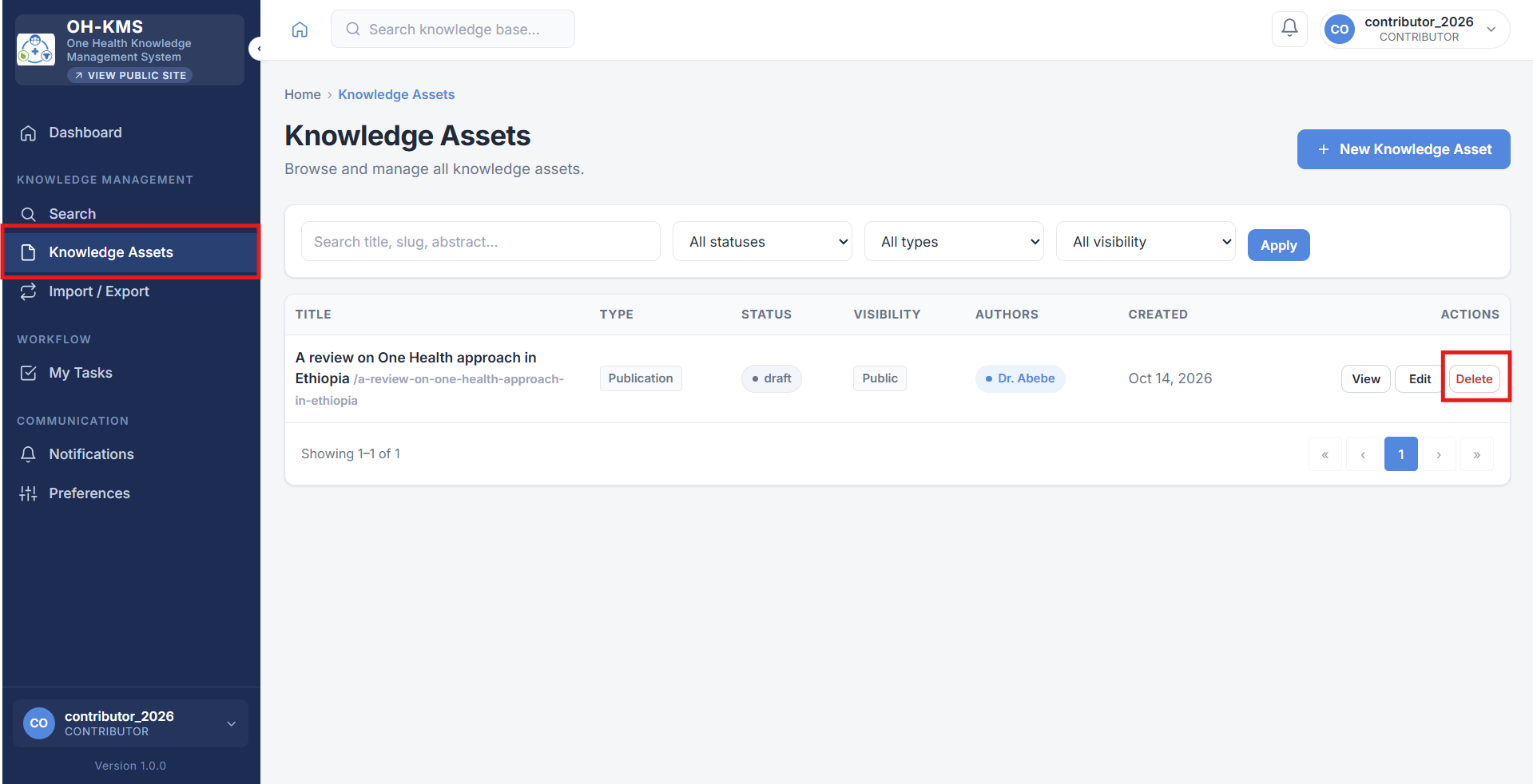
- From the left navigation panel, select Knowledge Assets.
- The list of your knowledge assets will be displayed.
- Locate the knowledge asset with the status Draft that you wish to delete.
- Click the Delete button corresponding to the selected knowledge asset.
- When prompted, confirm that you want to delete the draft.
- The selected draft knowledge asset will be permanently removed from the system.
Confirmation Message
Before deleting a draft, OHKMS displays a confirmation message to help prevent accidental deletion.
Select:
- Yes or Confirm to permanently delete the draft.
- No or Cancel to return to the knowledge asset list without deleting the draft.
Restrictions
The Delete function is available only for knowledge assets that:
- Are in Draft status.
- Are owned by the currently logged-in user.
- Have not yet been submitted for review.
Knowledge assets that have been submitted, approved, published, or archived cannot be deleted by Contributors. If such a knowledge asset must be removed, contact the Knowledge Manager or Super User, who will determine the appropriate action in accordance with your organization's policies.
Best Practices
Before deleting a draft knowledge asset:
- Confirm that the draft is no longer required.
- Ensure that any important information has been copied or incorporated into another knowledge asset, if applicable.
- Verify that you are deleting the correct draft, especially if you have multiple drafts with similar titles.